Enabling Scalable Learning Through Better Admin Tools
Enabling Scalable Learning Through Better Admin Tools
Clear structure and navigation led to higher completion and faster starts
Clear structure and navigation led to higher completion and faster starts
Role
Sole product designer, worked on research, facilitating ideation workshops, prototyping, testing, and delivery.
Team
Product Designer, Product Manager, 2 Back-end Engineer, 2 Front-end Engineer
Company
XU Group
Year
2023-2025

01.
Intro
As part of rebuilding the platform from scratch, a new learner-facing experience was designed and implemented first. To support this new product, the admin platform also needed to be rethought. The legacy admin tooling was tightly coupled to the old infrastructure, highly technical, and dependent on engineering for basic tasks. This case study focuses on designing a new admin experience that enabled self-serve setup, reduced operational friction, and allowed sales and account managers to support enterprise clients independently.
As part of rebuilding the platform from scratch, a new learner-facing experience was designed and implemented first. To support this new product, the admin platform also needed to be rethought. The legacy admin tooling was tightly coupled to the old infrastructure, highly technical, and dependent on engineering for basic tasks. This case study focuses on designing a new admin experience that enabled self-serve setup, reduced operational friction, and allowed sales and account managers to support enterprise clients independently.
01.
Intro
As part of rebuilding the platform from scratch, a new learner-facing experience was designed and implemented first. To support this new product, the admin platform also needed to be rethought. The legacy admin tooling was tightly coupled to the old infrastructure, highly technical, and dependent on engineering for basic tasks. This case study focuses on designing a new admin experience that enabled self-serve setup, reduced operational friction, and allowed sales and account managers to support enterprise clients independently.
What I did
UX & IA
UI design
Internal validation
Delivery & QA
What I did
UX & IA
UI design
Internal validation
Delivery & QA
Outcomes
34%
increase in course completion
40%
Faster start to learning
Outcomes
34%
increase in course completion
40%
Faster start to learning
02.
Discovery
The admin platform supported workspace setup, program creation, user management, and reporting for enterprise clients. While the learner-facing experience had improved, the admin side remained a bottleneck. Core tasks required backend support, technical knowledge, and long handoffs with engineering. This case study shows how simplifying admin workflows reduced setup time, removed engineering dependencies, and enabled sales and account managers to operate independently.
Inputs
Review of legacy admin workflows
Pattern review of common LMS and SaaS admin tools
Walkthroughs with sales and account managers using real tasks
Key findings
Core actions depended on engineering
Technical language didn’t match admin mental models
Setup and validation took too long
Errors were hard to detect or undo
02.
Discovery
The admin platform supported workspace setup, program creation, user management, and reporting for enterprise clients. While the learner-facing experience had improved, the admin side remained a bottleneck. Core tasks required backend support, technical knowledge, and long handoffs with engineering. This case study shows how simplifying admin workflows reduced setup time, removed engineering dependencies, and enabled sales and account managers to operate independently.
Inputs
Review of legacy admin workflows
Pattern review of common LMS and SaaS admin tools
Walkthroughs with sales and account managers using real tasks
Key findings
Core actions depended on engineering
Technical language didn’t match admin mental models
Setup and validation took too long
Errors were hard to detect or undo
Business objectives
To align the admin redesign with business needs, I worked closely with the product manager and internal stakeholders to understand where the existing setup slowed down growth and operations. The goal was not to recreate the legacy admin, but to design a new system that could support the rebuilt learning platform and scale with enterprise clients.
The main business objectives were:
Reduce setup time for new clients and demos
Enable sales and account managers to create workspaces and programs without engineering support.Remove engineering dependency from daily operations
Shift common admin tasks from backend-driven workflows to safe, self-serve UI flows.Support enterprise scalability
Design admin structures that work across multiple clients, programs, and user roles.Lower operational friction and cost
Reduce internal handoffs, delays, and support requests related to admin tasks.
Business objectives
To align the admin redesign with business needs, I worked closely with the product manager and internal stakeholders to understand where the existing setup slowed down growth and operations. The goal was not to recreate the legacy admin, but to design a new system that could support the rebuilt learning platform and scale with enterprise clients.
The main business objectives were:
Reduce setup time for new clients and demos
Enable sales and account managers to create workspaces and programs without engineering support.Remove engineering dependency from daily operations
Shift common admin tasks from backend-driven workflows to safe, self-serve UI flows.Support enterprise scalability
Design admin structures that work across multiple clients, programs, and user roles.Lower operational friction and cost
Reduce internal handoffs, delays, and support requests related to admin tasks.
Useability testing
03.
Design
The admin platform was designed to support the rebuilt learning product from day one. The goal was to replace backend-driven workflows with a self-serve admin experience that sales and account managers could use confidently, without engineering support.
Design goals
Based on discovery and stakeholder input, the redesign focused on four priorities:
Enable self-serve setup
Allow non-technical users to create workspaces, programs, and users without backend involvement.Reduce complexity in core workflows
Break down large, technical tasks into smaller, guided steps with clear labels and defaults.Align the system with admin mental models
Reflect how sales and account managers think about clients, programs, and learners.Design for scalability
Ensure the admin structure could support multiple clients, programs, and user roles as the business grew.
03.
Design
The admin platform was designed to support the rebuilt learning product from day one. The goal was to replace backend-driven workflows with a self-serve admin experience that sales and account managers could use confidently, without engineering support.
Design goals
Based on discovery and stakeholder input, the redesign focused on four priorities:
Enable self-serve setup
Allow non-technical users to create workspaces, programs, and users without backend involvement.Reduce complexity in core workflows
Break down large, technical tasks into smaller, guided steps with clear labels and defaults.Align the system with admin mental models
Reflect how sales and account managers think about clients, programs, and learners.Design for scalability
Ensure the admin structure could support multiple clients, programs, and user roles as the business grew.
Constraints and trade-offs
The new admin platform was built on top of a headless CMS, which defined how learning content was structured and delivered. At the same time, product decisions around content assignment across different clients and programs were still evolving.
Rather than redesigning content assignment prematurely, I intentionally excluded this area from the scope. The focus stayed on workflows with clear ownership and immediate business impact, such as program creation and user management. This trade-off avoided locking the product into assumptions that could limit scalability later.
Constraints and trade-offs
The new admin platform was built on top of a headless CMS, which defined how learning content was structured and delivered. At the same time, product decisions around content assignment across different clients and programs were still evolving.
Rather than redesigning content assignment prematurely, I intentionally excluded this area from the scope. The focus stayed on workflows with clear ownership and immediate business impact, such as program creation and user management. This trade-off avoided locking the product into assumptions that could limit scalability later.
Card sorting to test whether content naturally grouped into Dashboard, Explore, and Progress
Program creation and settings
One of the main bottlenecks in the legacy setup was program creation. Previously, creating a new program required backend work and coordination with engineering.
The redesign introduced a simple, guided flow:
Create a program with a single action
Define the program name
Confirm and adjust settings inline after creation
This shift moved program setup from a request-based process to a self-serve workflow, reducing setup time and removing unnecessary handoffs.
Program creation and settings
One of the main bottlenecks in the legacy setup was program creation. Previously, creating a new program required backend work and coordination with engineering.
The redesign introduced a simple, guided flow:
Create a program with a single action
Define the program name
Confirm and adjust settings inline after creation
This shift moved program setup from a request-based process to a self-serve workflow, reducing setup time and removing unnecessary handoffs.
User management
User management was redesigned end to end, both at a global level and within individual programs.
Key changes included:
Clear separation between global users and program-specific users
Explicit role definitions with visible labels
Safer defaults to reduce configuration errors
Simpler invitation flows for adding new learners
I worked closely with the product manager to reduce unnecessary flexibility and focus on the roles and actions admins actually needed. This made the system easier to understand and lowered the risk of mistakes.
User management
User management was redesigned end to end, both at a global level and within individual programs.
Key changes included:
Clear separation between global users and program-specific users
Explicit role definitions with visible labels
Safer defaults to reduce configuration errors
Simpler invitation flows for adding new learners
I worked closely with the product manager to reduce unnecessary flexibility and focus on the roles and actions admins actually needed. This made the system easier to understand and lowered the risk of mistakes.
Linking admin and learner experiences
To support faster validation and reduce context switching, the admin and learner platforms were designed to be directly connected. Managers could open the learner experience from the admin to review their changes in context. Likewise, users assigned as managers could access the admin directly from the learning app.
This made it easier to verify setups, reduced guesswork, and helped internal users move between configuration and experience without relying on engineering or separate tools.
Linking admin and learner experiences
To support faster validation and reduce context switching, the admin and learner platforms were designed to be directly connected. Managers could open the learner experience from the admin to review their changes in context. Likewise, users assigned as managers could access the admin directly from the learning app.
This made it easier to verify setups, reduced guesswork, and helped internal users move between configuration and experience without relying on engineering or separate tools.
Validation and iteration
Design decisions were validated through regular walkthroughs with internal users, including sales and account managers. Feedback focused on clarity, speed, and confidence when performing daily tasks.
Iterative reviews helped refine terminology, reduce steps in critical workflows, and confirm that the new admin experience supported real-world use cases like demos and client onboarding.
Validation and iteration
Design decisions were validated through regular walkthroughs with internal users, including sales and account managers. Feedback focused on clarity, speed, and confidence when performing daily tasks.
Iterative reviews helped refine terminology, reduce steps in critical workflows, and confirm that the new admin experience supported real-world use cases like demos and client onboarding.
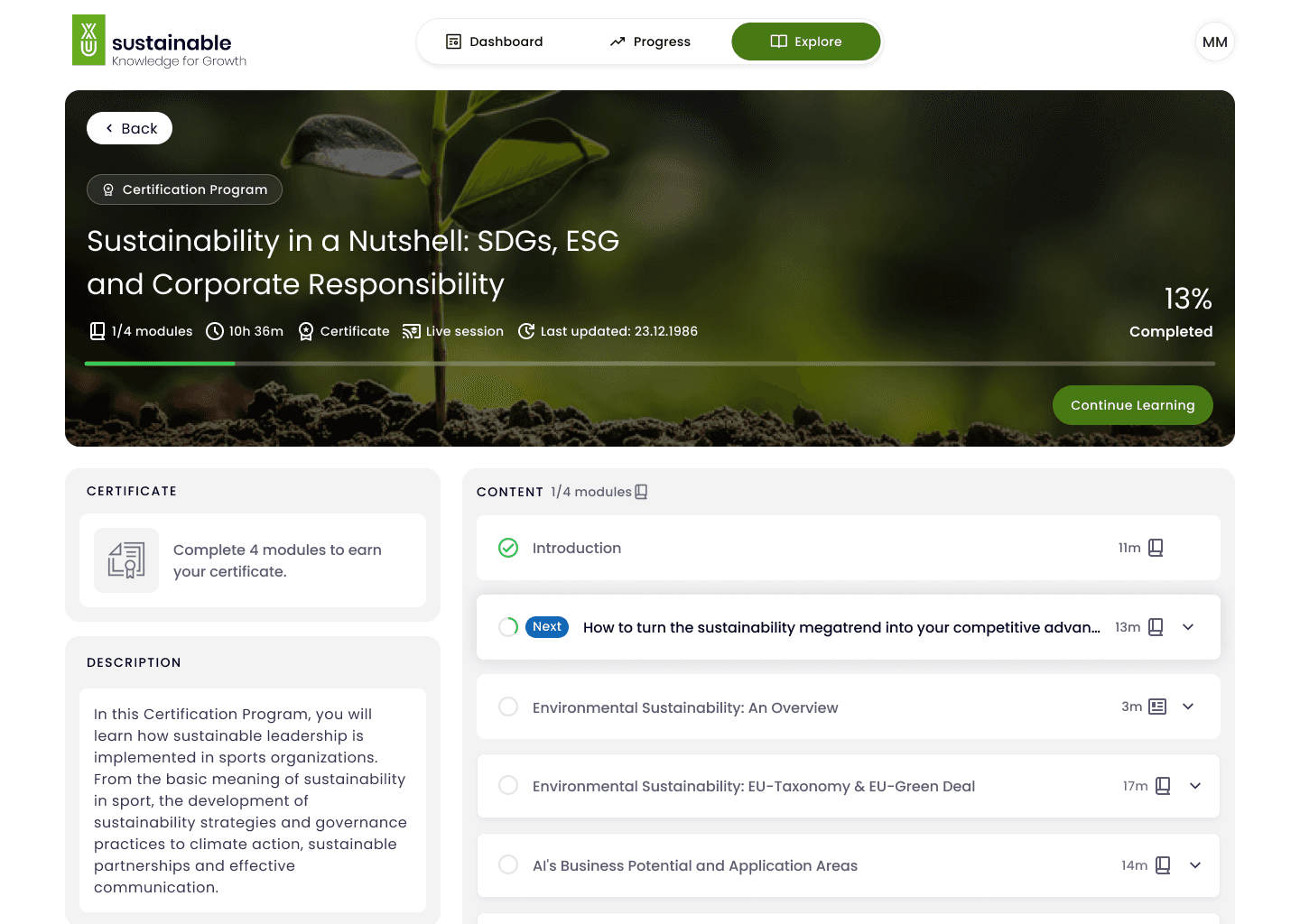
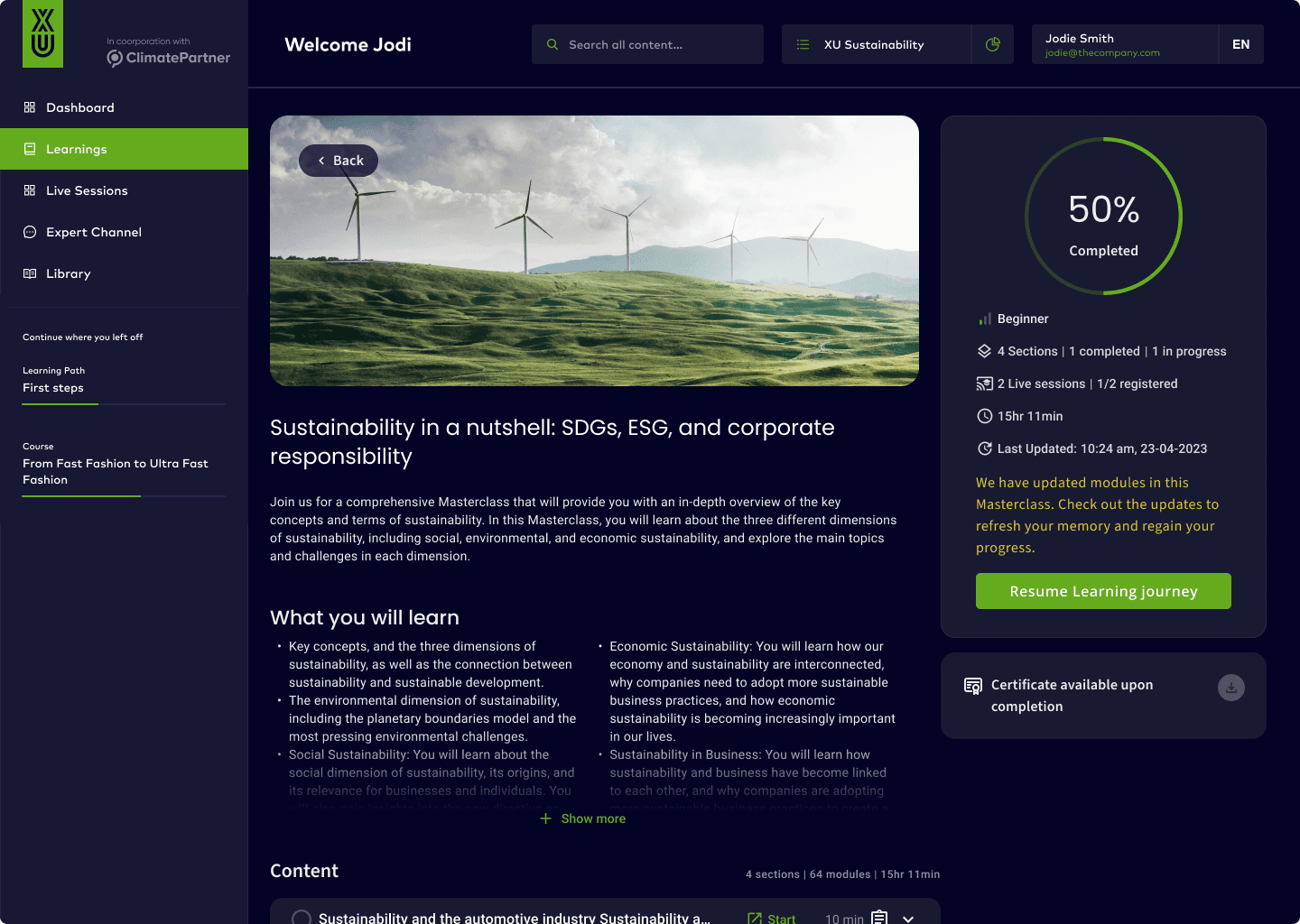
Before
After
04.
Impact
The redesigned admin platform removed engineering dependencies from everyday tasks and enabled sales and account managers to operate independently. By shifting core workflows to self-serve flows and reducing complexity, the admin experience became faster, safer, and easier to use.
5× faster workspace and program setup
Creating a new workspace or program no longer required backend work. What previously took hours of coordination could now be completed in minutes through guided, self-serve flows.
Reduced reliance on engineering (−70%)
Common tasks such as program creation, user management, and basic configuration moved out of the backend. Engineering involvement dropped significantly, allowing teams to focus on product development instead of operational support.
Faster and more effective sales demos
Sales teams could prepare demo environments independently and make changes on the fly. This reduced lead time before demos and improved confidence during customer conversations.
Lower error rate in admin configuration
Clear role separation, visible labels, and safer defaults reduced mistakes during user and program setup, especially for non-technical users.
Stronger connection between admin and learner experiences
Direct links between the admin and learner apps made it easier for managers to validate changes in context, reducing rework and back-and-forth between teams
34%
Improved learning completion
40%
Faster start to learning for first-time users
Fewer support tickets related to learning content
A scalable foundation for future learning features
04.
Impact
The redesigned admin platform removed engineering dependencies from everyday tasks and enabled sales and account managers to operate independently. By shifting core workflows to self-serve flows and reducing complexity, the admin experience became faster, safer, and easier to use.
5× faster workspace and program setup
Creating a new workspace or program no longer required backend work. What previously took hours of coordination could now be completed in minutes through guided, self-serve flows.
Reduced reliance on engineering (−70%)
Common tasks such as program creation, user management, and basic configuration moved out of the backend. Engineering involvement dropped significantly, allowing teams to focus on product development instead of operational support.
Faster and more effective sales demos
Sales teams could prepare demo environments independently and make changes on the fly. This reduced lead time before demos and improved confidence during customer conversations.
Lower error rate in admin configuration
Clear role separation, visible labels, and safer defaults reduced mistakes during user and program setup, especially for non-technical users.
Stronger connection between admin and learner experiences
Direct links between the admin and learner apps made it easier for managers to validate changes in context, reducing rework and back-and-forth between teams
34%
Improved learning completion
40%
Faster start to learning for first-time users
Fewer support tickets related to learning content
A scalable foundation for future learning features
05.
05.
Learnings
Learnings
1. Internal tools succeed when they remove dependencies
The biggest improvement did not come from visual polish, but from removing engineering from everyday admin tasks. Designing self-serve workflows had a larger impact on speed and confidence than adding advanced features.
05.
Learnings
1. Internal tools succeed when they remove dependencies
The biggest improvement did not come from visual polish, but from removing engineering from everyday admin tasks. Designing self-serve workflows had a larger impact on speed and confidence than adding advanced features.
Clarity beats feature richness
2. Language matters more than UI in admin experiences
Technical labels and system-driven terminology slowed down even experienced users. Reframing concepts in the language of sales and account managers made the system easier to understand and safer to use.
“Good enough” task completion isn’t success
3. Reducing flexibility can increase adoption
Some areas of the legacy admin were highly configurable but hard to reason about. Working with the product manager to reduce options and introduce clearer defaults made core workflows faster and less error-prone.
Constraints shape better design decisions
4. Excluding features can be a strategic decision
Content assignment was intentionally left out of scope due to unresolved product decisions around multi-client ownership. Deferring this work avoided premature assumptions and kept the admin platform flexible for future growth.
Early validation prevents over-design
5. Connecting internal and external tools improves confidence
Linking the admin and learner platforms reduced guesswork and made validation easier. Allowing managers to switch between configuration and experience helped teams move faster and trust their changes.
Let's collaborate
hello@oncephysical.com
Ahmed Negm
Let's jam
hello@oncephysical.com
Ahmed Negm
Let's collaborate
hello@oncephysical.com
Ahmed Negm
Let's collaborate
hello@oncephysical.com
Ahmed Negm